
Contact us

Now piloting with leading mortgage advisors

Focus on advising.
Paperwork is on us.

Tikli takes on all the tedious work of collecting and checking documents, end to end, with AI that reads and cross-checks every document. You receive a reviewed, bank-ready file, and are free for what clients truly need from you: advice.

Join the pilot

Tikli · Cohen Mortgages

Hi Michal, thank you for sending your credit report.

The report shows a car loan with an outstanding balance of about ₪62,000, which was not on your list of loans. Is it still active?

Oh right, I forgot about that one. It comes out of my Discount Bank account every month

Thank you, I have added it to your file. So that the bank can see the repayments, we will need the last 3 months of statements for that account and an account confirmation letter. For security reasons, please upload them only via the secure link:

Update · Levi fileUndeclared car loan identified and added to the filePending: statements + account letter

Tikli · Cohen Mortgages

How do I get the credit report?

Certainly. It takes a few minutes on the Bank of Israel website, creditdata.org.il:
1. Sign in with your national digital ID
2. "All actions" → "Order a report"
3. "Consolidated data report", 3 years, digital
4. When the email arrives, download the PDF
5. Upload it here via the secure link 🔒

I'm stuck on step 2, where is it? 😅

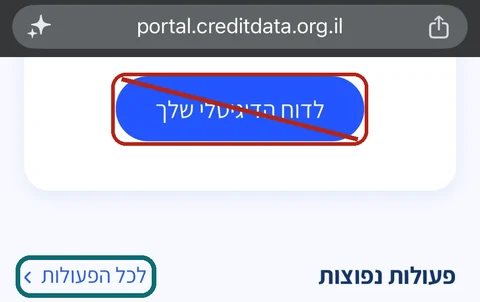
Screenshot of the personal area, in Hebrew: the 'All actions' link is highlighted, and the 'Your digital report' button is marked as the wrong oneNot the blue button 🙂 Please scroll down slightly and select "All actions" on the left.

Found it, carrying on!

Update · Sagi fileClient guided through step 2 of the report requestPending: consolidated credit report

Tikli · Cohen Mortgages

Thank you, Yoav. I have received all three payslips.

Your March payslip includes a ₪12,000 payment listed as a "grant", which appears to be an annual bonus. Is it paid every year?

Yes, every March, four years running

Excellent, that matters for your file. For the bank to recognise the bonus as income, we will need your Form 106 for the past two years. It is available from your employee portal or from HR. Once you have it, please upload it here:

Update · Avraham fileAdditional income identified: a recurring annual bonusPending: Form 106, past 2 years

Sound familiar?

We built Tikli after extensive conversations with mortgage advisors, who described the same challenges time and again.

The challenge

Documents that contradict the client's account

The wrong document, the right document for the wrong person, or figures that contradict what the client reported. These issues only surface through a careful review of every document.

With Tikli

Tikli does more than collect documents. It reads and understands each one, cross-checks it against the client's account and the rest of the file, and resolves most discrepancies with the client directly. Only what genuinely requires a professional decision is passed to you.

Finding · Levi file

Client reported₪14,000 salary

Payslips show₪12,600 on average

⚠ Discrepancy flagged for your review
The challenge

Documents that expire mid-process

By the time the file reaches the bank, the account statements are no longer current and the latest payslip has been superseded.

With Tikli

Tikli tracks the validity of each document and requests an updated version from the client before the file goes to the bank, so there are no last-minute surprises.

Validity check · Avraham file

Account statementsreceived 41 days ago

Bank requirementwithin 30 days

↻ Updated version requested
The challenge

Documents lost in group chats

Borrowers, spouses, guarantors and dozens of files in a single group. Where is the March payslip?

With Tikli

Tikli assigns each document to the correct case and the correct person, even when a case involves several borrowers and guarantors. At any moment you can see what has been received and what is still outstanding, for each of them.

Levi file · 3 people, 24 documents

Michal · borrower9/10

Danny · borrower7/10

Ruth · guarantor4/4

Every document filed correctly
The challenge

Unworkable file names

A file named IMG_4823.jpg is difficult to locate later, and cannot be sent to the bank in that form.

With Tikli

Tikli gives every file a clear, consistent name: the document type, the client's name and the period. The file is organised and ready for the bank.

File naming · Avraham file

IMG_4823.jpgPayslip · Yoav Avraham · 03-2026

scan_20260314.pdfAccount statement · Yoav Avraham · 01-03/2026

Ready to submit to the bank
The challenge

Following up with clients

Another message, another reminder, and another week passes without the account confirmation letter.

With Tikli

Tikli sends courteous, professional reminders on your behalf, at the right pace. You never have to play the bad cop, and your relationship with the client stays pleasant.

Account confirmation letter · Sagi file

Sundayinitial request

Tuesdaybrief, courteous reminder

Thursdaydocument received

✓ Not a single message from you
The challenge

Clients less familiar with technology

Many clients do not know where to obtain a credit report, a Form 106 or their account statements, so they call you to ask.

With Tikli

Tikli guides the client step by step, with screenshots, and answers in natural conversation exactly where they get stuck. Your phone stays quiet.

Guidance · credit report

Step 1National digital ID ✓

Step 2"All actions" → "Order a report" ✓

Step 3PDF downloaded from the email ✓

Report received and reviewed
The challenge

Non-standard documents

Every case has its own requirements, and only years of experience reveal what the bank will actually request.

With Tikli

Tikli knows dozens of these documents, mapped together with experienced advisors, and requests the right one based on the details of the case: self-employment, a prenuptial agreement, Israel Land Authority property, maternity leave.

A selection of mapped documents

Israel Land Authority rights letterLoan payoff letterPrenuptial agreementMaternity leave confirmationSelf-employed tax assessmentAnd dozens more

How it works

  1. Open a case

    Enter your clients' details, and Tikli contacts them on your behalf.

  2. Tikli collects and reviews

    It requests each document at the appropriate stage, reviews it, cross-checks the details, and sends a courteous reminder when anything is outstanding. There is no need to keep track of what is missing and from whom: Tikli does it for you.

    You remain in control: every significant finding comes to you, and at any point you can join the conversation, respond to the client directly, adjust Tikli's requests, or pause it.

  3. Receive a complete file

    An organised file in your Google Drive, with the findings that require your attention highlighted, ready to submit to the bank.

Your files stay with you

Frequently asked questions

Does Tikli replace the advisor?

No. Tikli handles the routine work of document collection. Advice, decisions and the relationship with the bank remain with you.

Are clients aware that they are communicating with AI?

Yes. The first message introduces Tikli as your digital case operator, and clients may ask to speak with their advisor at any stage.

What happens when a client asks something Tikli does not know?

It does not guess. Tikli tells the client it is looking into it and passes the question to you. You reply, directly or through Tikli, and the conversation continues.

Do I need to switch systems to work with Tikli?

No. Tikli works alongside the tools you already use, and your files are kept in your own Google Drive.

What does it cost?

Pilot terms are agreed together with you. Please get in touch and we will respond promptly.

Would you like to see Tikli at work on a real case?

Join the pilot